
Service checklists
Checklists are verification lists the team fills in during the visit, they standardize quality and serve as a record of what was done to the pet.
How to standardize service and never slip up with a pet again? #

A mistake with a pet has no excuse
The detail left to memory becomes the complaint that goes viral.
“Wrong cut, swapped perfume, lost belonging: the owner never forgets, and tells everyone.”
Grooming preference, allergy, point of attention, the customer's belongings… when it depends on memory, someone slips. Redoing it costs time, a freebie and trust.
Stage-by-stage checklists put your standard inside the system. A brand-new hire already serves at the same level, and the owner gets proof of what was done on each pet.
One checklist per stage
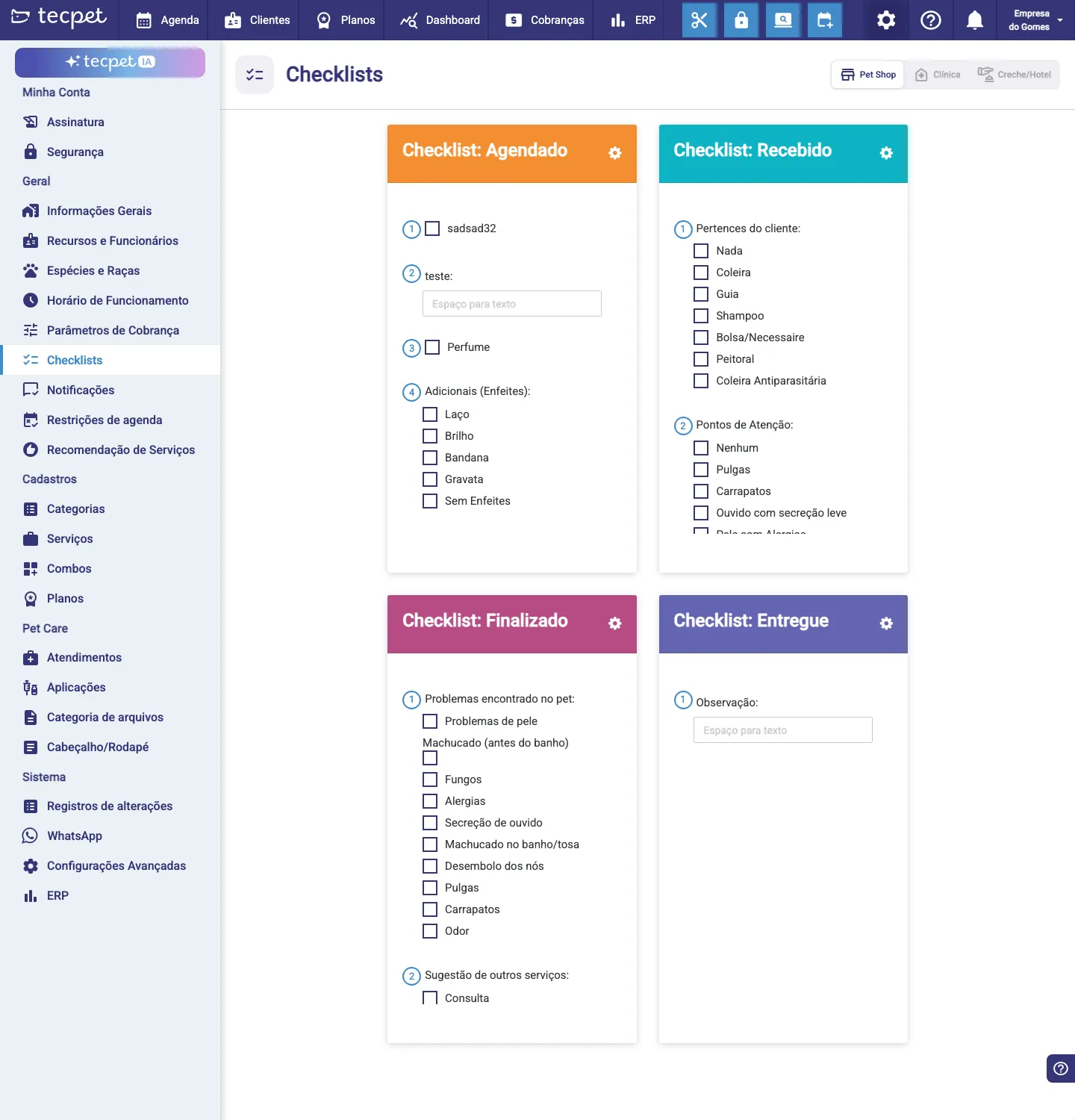
Section titled “One checklist per stage”The screen has four checklists, one for each moment of the visit, chosen by the segment tab (Pet Shop, Clinic, Daycare/Hotel):
- Scheduled checklist: filled when booking/receiving (e.g. Perfume, Add-ons/Bows);
- Received checklist: on the pet’s arrival (e.g. Customer’s belongings, Attention points like fleas/ticks);
- Finished checklist: when done (e.g. Problems found, Suggestion of other services);
- Delivered checklist: at delivery (e.g. Note).
Item types
Section titled “Item types”Each checklist can have items of different types:
- Checkbox (yes/no, e.g. Perfume);
- Multiple choice (pick among options, e.g. Customer’s belongings, Collar, Leash, Shampoo…);
- Free text (e.g. Note, Attention points).
Build the items according to your store’s routine and click Save.
Where the checklist shows up
Section titled “Where the checklist shows up”The checklist configured here appears inside the appointment: in the last step when creating it (see Create an appointment) and in the Checklist button of the visit’s details window. So the team fills it in on the spot and it stays recorded.
The checklist belongs to that appointment, but you don’t have to reopen each visit to review it: on the client profile, in the all appointments view, click View checklist and the system shows the checklists of all that client’s appointments at once.
Checklist × Pet Care: which one to use
Section titled “Checklist × Pet Care: which one to use”The checklist is a per-appointment review, great for standardizing what’s done in each visit. It is not a single, continuous patient record.
If the client wants to keep a single record for the pet, with the continuous health history, the way to go is Pet Care: there you log anamnesis, prescriptions, exams, reports, consent forms, weigh-ins, vaccines and other documents. Pet Care can be logged from the appointment or straight in the pet’s record and, in both cases, the entries are always visible in the pet’s record: forming the patient’s chart. See Use Pet Care day to day.