
What changes with the integration on
When your shop has an active ERP integration (VHSYS, Bling, Omie and others), tecpet starts showing where the conversation with the external system stands. This appears in three places: on the Billing screen, in each invoice’s ERP Items column; on the customer record, as a cloud icon next to the name plus an Integration section at the end of the form; and, in the ERPs that sync the catalog, on the Services list, with an icon per service. All of them offer a Sync history that logs every attempt, including the failure reason when something goes wrong. This is how you find out, without opening the ERP, whether that customer, that service or that invoice actually made it to the other side.
Step 1: Check each invoice’s status on Billing
Section titled “Step 1: Check each invoice’s status on Billing”In the top menu, click Billing. In the list, the last column before Operations is called ERP Items: it shows where each invoice stands in your ERP, from becoming a document to having the tax document issued.
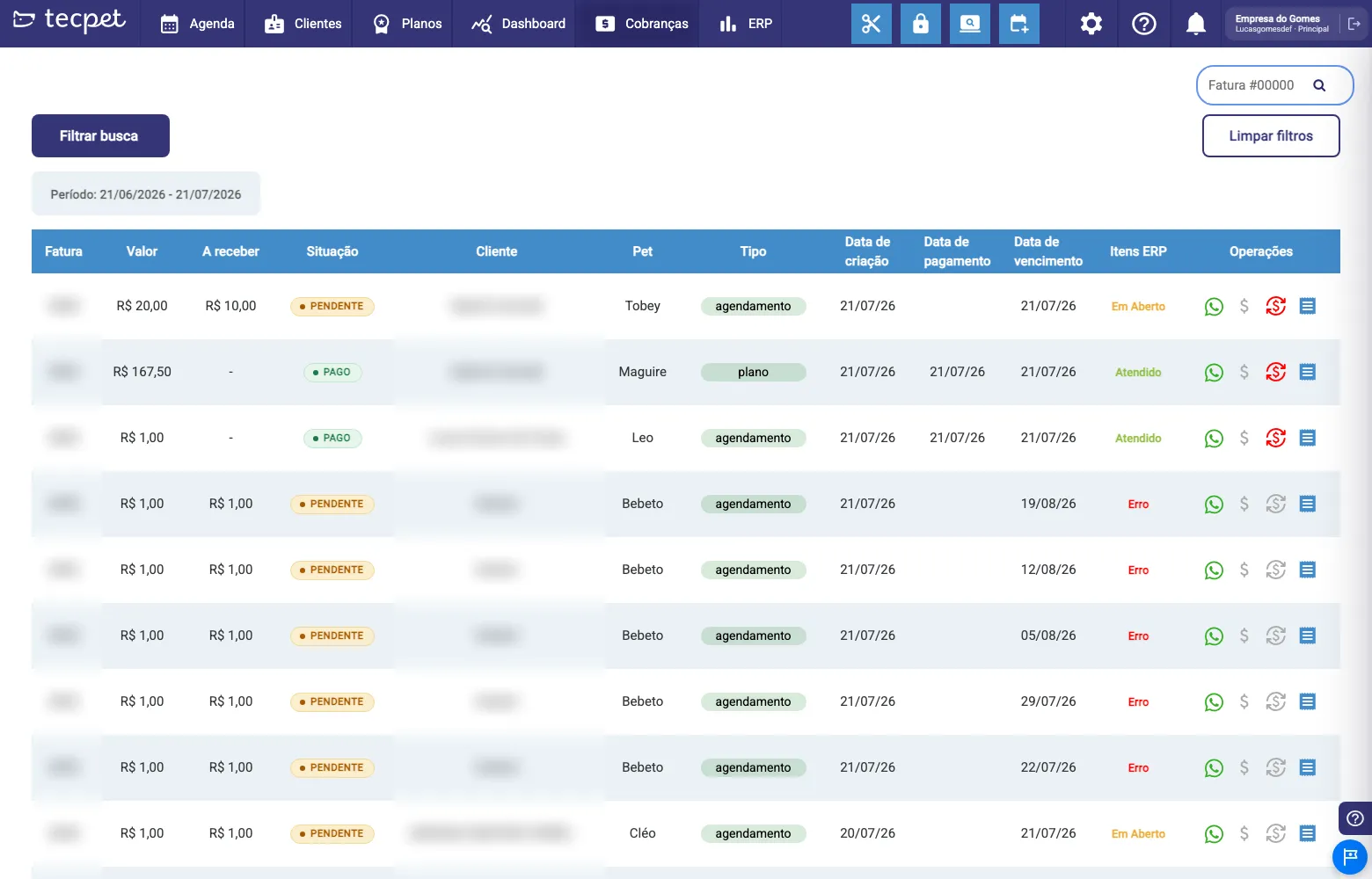
Don’t mix up the two status columns in the list:
- Status: the state of the invoice inside tecpet (PENDING or PAID);
- ERP Items: the state of the sync with the ERP.
An invoice can be PAID in tecpet and still show Error under ERP Items: meaning the money was recorded here, but the document didn’t reach (or wasn’t updated in) your ERP.
Step 2: Understand what each state means
Section titled “Step 2: Understand what each state means”The names shown under ERP Items change according to your shop’s ERP: in VHSYS shops, tecpet uses the same names you see inside VHSYS; with the other ERPs, it uses tecpet’s own names. The meaning is the same, only the label changes.
| What happened | In a VHSYS shop | In the other ERPs |
|---|---|---|
| Not part of the ERP flow | - | Suspended |
| Being sent right now (momentary state) | Processing | Processing |
| Already a document in the ERP, not yet paid | Open | Awaiting Payment |
| The document was settled/accepted in the ERP | Fulfilled | Integrated |
| Ready for the tax document to be issued | Awaiting Issue | Awaiting Issue |
| The tax document was issued successfully | Issued | Issued |
| The invoice/document/note was canceled | Canceled | Canceled |
| The sync or the issuing failed | Error (in red) | Error (in red) |
Step 3: Check the integration icon on the customer record
Section titled “Step 3: Check the integration icon on the customer record”Open Customers, find the customer in the list and click the profile button (the last icon in the row). On the General Information tab, next to the customer’s name, a colored cloud icon appears. Hover over it to see the tooltip.

The four possible states of the icon:
- Integrated with the ERP: green cloud with a check: the customer record is in the ERP and up to date;
- Syncing with the ERP: green cloud with arrows: the send is happening right now;
- Integration with the ERP failed: red crossed-out cloud: the last attempt went wrong;
- Not synced with the ERP yet: grey cloud: this customer has never been sent to the ERP.
Step 4: Read the Integration section at the end of the record
Section titled “Step 4: Read the Integration section at the end of the record”Still on General Information, scroll the form to the bottom. After Blocked notifications and before Custom fields sits the Integration section, with the details of the last sync.
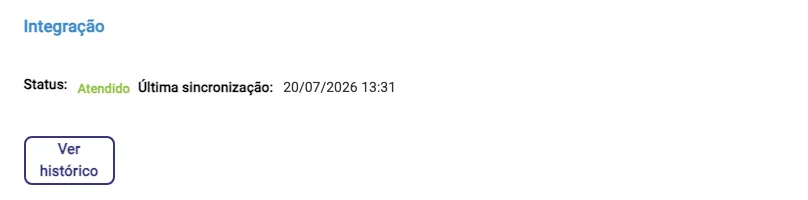
The fields, one by one:
- Status: the record’s current state in the ERP, using the same labels as the ERP Items column (in the example above, Fulfilled, since it’s a VHSYS shop);
- Last sync: date and time of the last successful attempt, in
dd/mm/yyyy hh:mmformat; - Source: which side the change came from: tecpet (it left from here) or External system (it came from the ERP). Only shows when that information was recorded;
- Failing for N attempt(s): a warning box that only appears when there are consecutive failures. It’s the sign that the problem is permanent (a mismatched record), not a momentary hiccup;
- Failure reason: a warning box with the message the ERP returned. Only appears when the Status is Error. It’s the most valuable piece of information on the screen: it usually says exactly what to fix (duplicate document, invalid city, empty required field);
- View history: the button that opens the window in Step 5.
If the customer has never been sent to the ERP, the section shows only the text Not synced yet.: no status, no date and no history button.
Step 5: Open the Sync history
Section titled “Step 5: Open the Sync history”Click View history. The Sync history, customer name window opens, with one row per attempt, newest first.
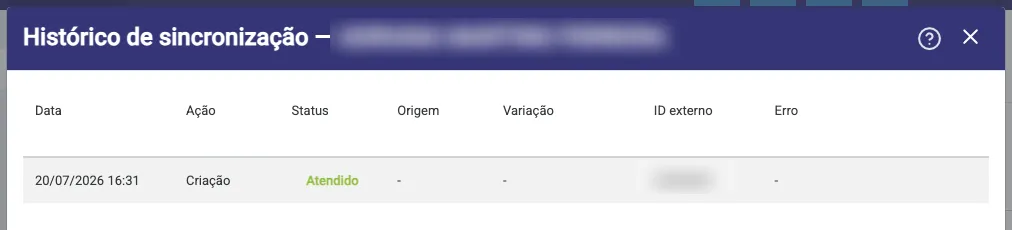
The columns:
- Date: when the attempt happened (
dd/mm/yyyy hh:mm); - Action: what was attempted: Creation, Update or Removal;
- Status: how it ended, using the same labels as the ERP Items column (Processing, Fulfilled/Integrated or Error);
- Source: tecpet or External system; when there’s no record, it shows -;
- Variation: used in the services history, to say which price tier the row refers to (breed, or size and coat). For customers it shows -;
- External ID: the record’s number inside the ERP. That’s the code you (and support) use to find the same record on the other side;
- Error: the message returned by the ERP on that attempt; - when it worked.
To leave, click Close. If there has never been an attempt, the window shows No sync history.
Step 6: Open a service’s sync summary
Section titled “Step 6: Open a service’s sync summary”Go to Settings › Records › Services (the Registered services screen), pick the segment tab, expand the category (e.g. Category: Bath) and click the cloud icon at the far right of the row. The Sync, service name popover opens.
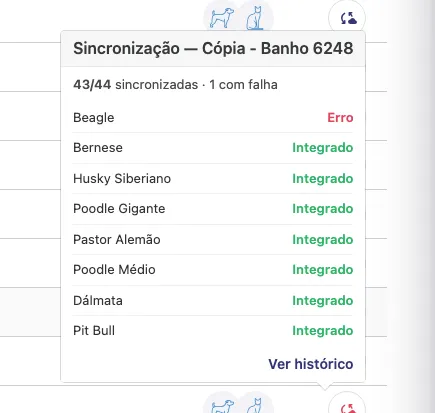
What the popover shows:
- Summary: at the top, in the format 43/44 synced. The · 1 failed part only appears when there is a failure;
- One row per price tier: the variation name on the left, the result on the right, with only two possible values: Integrated (green) or Error (red);
- View history: a link in the footer that opens the same window as Step 5, now with that service’s attempts.
The variation name depends on how your shop prices:
- Pricing by breed: the breed name shows up (Beagle, Bernese, Siberian Husky, Giant Poodle…);
- Pricing by size and coat: size · coat shows up (e.g. Small · Short);
- Daycare and Hotel services: the period is added in front, forming period · size · coat (e.g. Morning · Small · Short). The possible periods are Morning, Afternoon and Full day.
If that service has never been sent, the popover shows Not synced yet.
Services and products in the ERP
Section titled “Services and products in the ERP”In the ERP, tecpet organizes the invoice into two document types:
- Service Order (OS), for the visit’s services;
- Sales Order (PV), for the products (which also reduce ERP stock).
An invoice with services and products can generate both, which is why the column is called ERP Items, in the plural. With the integration on, you can also add ERP products right on the invoice, alongside the services, by searching the item in the catalog (local and from the ERP). It’s a feature enabled by support; the step by step is in Inside the invoice.
When Error shows up
Section titled “When Error shows up”- Open the customer record and read the Failure reason in the Integration section (or the Error column in the Sync history), it usually says exactly what’s wrong;
- Fix whatever it points to in the record: tax ID, name, address (including city and state), phone. A mismatched record is the #1 cause;
- Save the record and check, on the cloud icon, whether it went back to Integrated with the ERP;
- Only then go back to Billing and reprocess the invoice.
If the error persists after fixing the record, or if several invoices from different customers fail at the same time, it’s probably the ERP connection (expired credentials, external system instability), contact support, quoting the External ID shown in the history.
How to fix and follow up afterwards
Section titled “How to fix and follow up afterwards”- Customer record: reopen the profile at Customers › profile › General Information, adjust the fields and save. Each new attempt enters the Sync history as an Update;
- Service: reopen the service at Settings › Records › Services, fix price/duration and save; the sync popover is reloaded every time you open it, with the latest result;
- Invoice: reprocess it from the Billing screen after solving the cause. While the state is Processing, just wait: it’s momentary and needs no action;
- None of this erases what already went to the ERP. Fixing things here updates the record on the other side (when the integration is two-way), it never creates a parallel record.
To understand what each ERP syncs (and what it doesn’t), see What integrations are.