
Track plans and packages
The Plans screen shows all the plans and packages your customers have, with each one’s status, so you can track renewals and expirations.
Filters by expiration
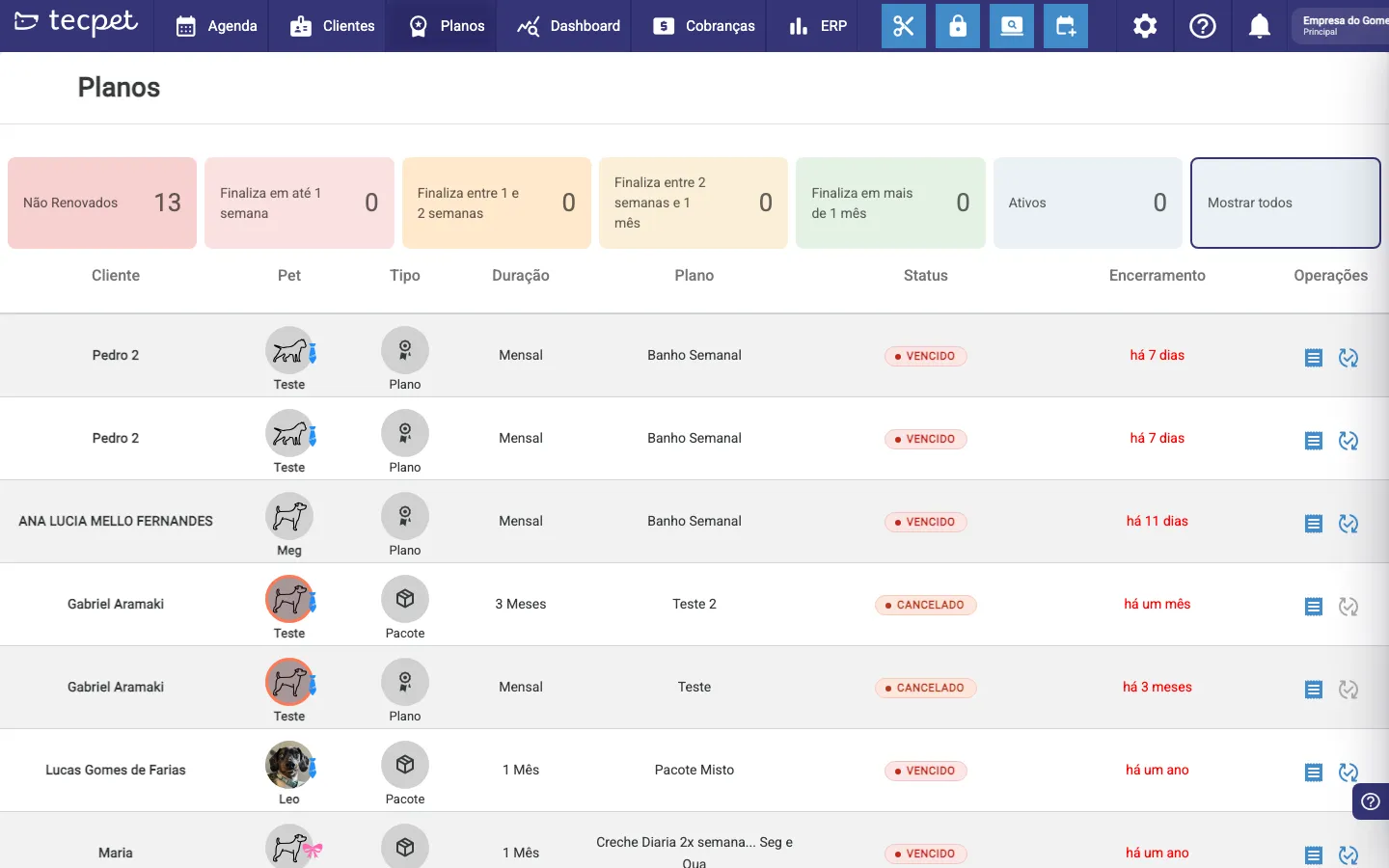
Section titled “Filters by expiration”The cards at the top group plans by how close they are to ending: Not Renewed, Ends within 1 week, between 1 and 2 weeks, between 2 weeks and 1 month, in more than 1 month and Active. Click Show all to see the full list.
The plan list
Section titled “The plan list”Each row shows the Customer, the Pet, the Type (Plan or Package), the Duration, the Plan name, the Status (Active, Expired or Cancelled) and the End date.
Act on a plan
Section titled “Act on a plan”In the Operations column, on the right, you’ll find the shortcut to the plan’s invoices and the renew button.
The client’s plan list
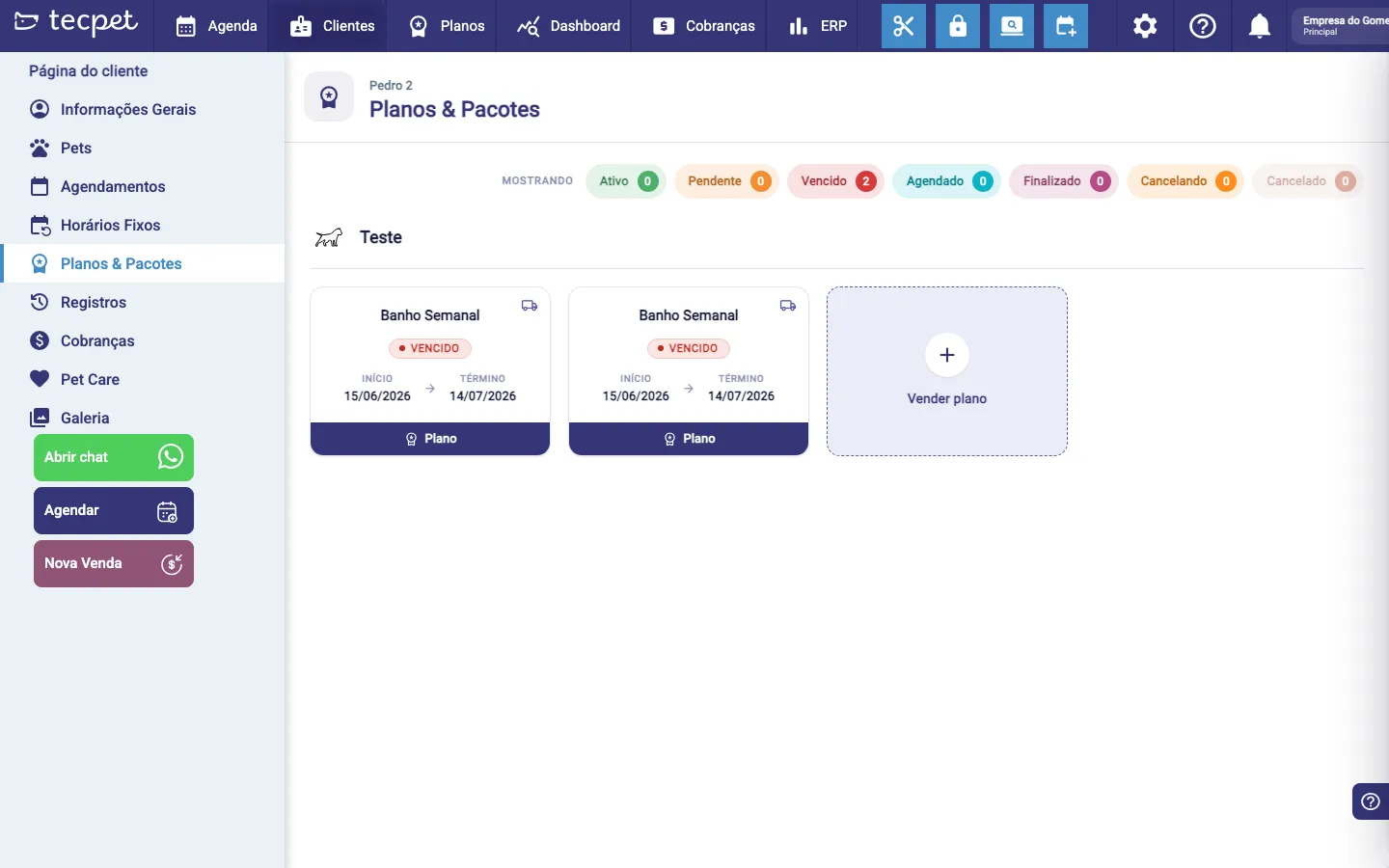
Section titled “The client’s plan list”To see one client’s plans, open their profile and go to Plans & Packages. The screen groups plans by pet and brings, at the top, a filter with the count for each status:
- Active: in use, within the validity;
- Pending: sold, waiting for the start or the first charge;
- Expired: past the end date;
- Scheduled: with the visits already booked;
- Finished: the client used everything they were entitled to;
- Canceling: cancellation in progress;
- Canceled: closed.
Click any status to filter. Canceling and Canceled are different statuses and show in distinct colours, don’t mix up a cancellation still in progress with one already completed.
The sold plan screen
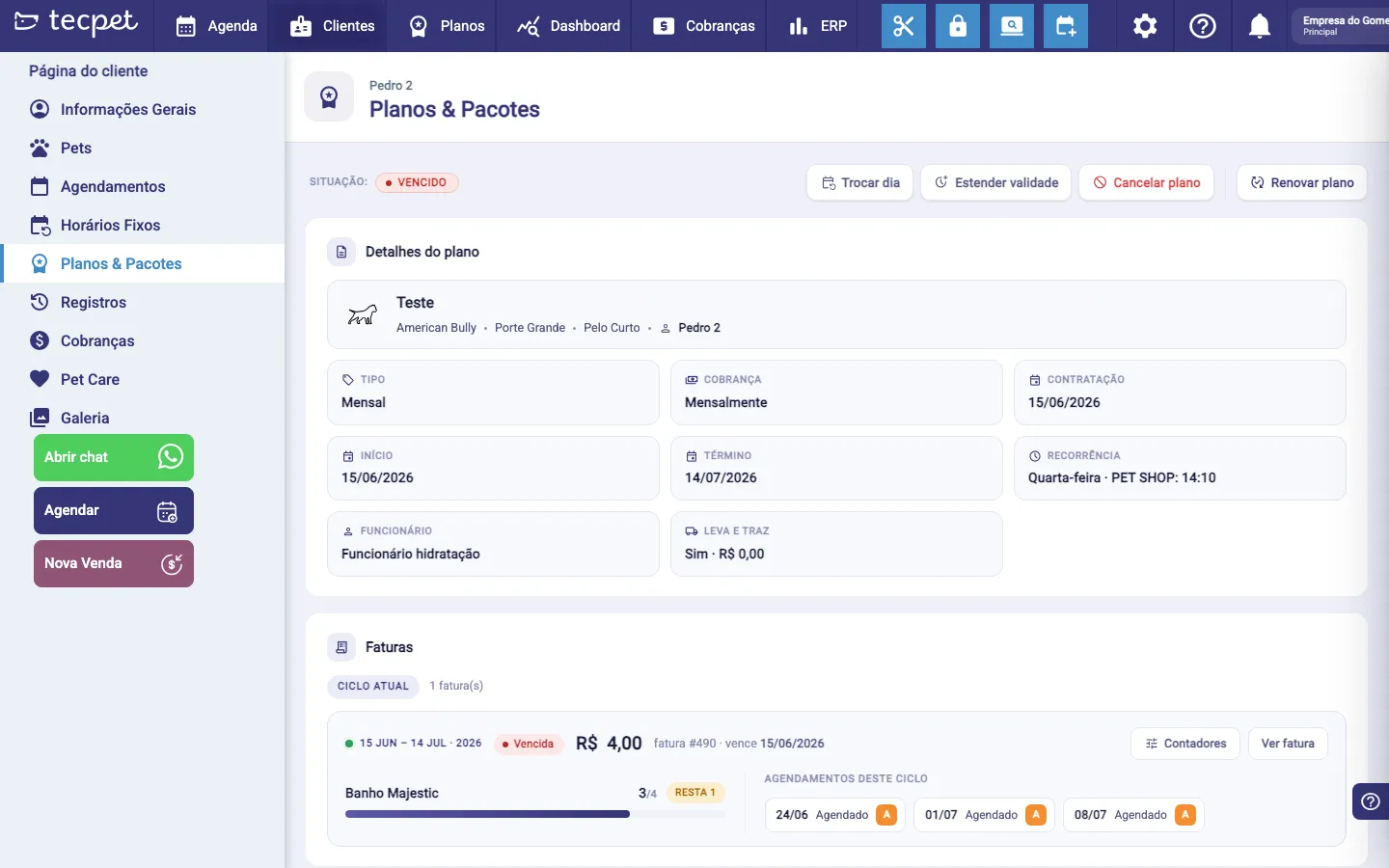
Section titled “The sold plan screen”Click the plan card to open the detail. At the top are the Status and the actions, Change day, Extend validity, Cancel plan and Renew plan.
The page gathers, on a single screen:
- Plan details: the pet (breed, size and coat), the client, the Type, the Billing, the Signed on, Start and End dates, the Recurrence (weekday and time), the Employee and whether it has Pick-up and delivery;
- Invoices: the current cycle, with the period, status and value of each invoice, and the View invoice shortcut;
- Counters: how much of each service has been used and how much is left (e.g. Bath 3/4 · 1 left);
- Appointments in this cycle: the list of the cycle’s visits with date and status;
- Usage history: the calendar of everything already consumed on the plan;
- Plan records: the timeline of what happened (sale, changes, cancellations).
Reschedule vs. cancel a package appointment
Section titled “Reschedule vs. cancel a package appointment”When a customer has a package with several appointments already booked, touching one of them reorganizes the whole package: the cycles, the dates and the due dates. It’s worth understanding how before you act.
First, three quick concepts:
- A package’s appointments are organized into cycles, and each cycle is one invoice. For example, a weekly bath package might group 4 baths into one invoice.
- The due date of each invoice is calculated from the appointment dates in that cycle: if the shop charges at the start of the block, the due date is the day of the first appointment; if it charges at the end, it is the day of the last one.
- Each cycle has a period and a number of appointments included. That is what defines whether another appointment still fits in that cycle.
The reorganization, in two steps
Section titled “The reorganization, in two steps”Cancelling or rescheduling an appointment triggers the package reorganization:
- Who sits in which cycle. The appointments are distributed in date order, and each one goes into the first cycle that still has credit for all of its services. In practice the following ones move up, and the free slot ends up in the last cycle, which is where the replacement fits. Inside each cycle, the order of the visits goes back to the cadence of the sale: the service that shows up every so often (the fortnightly grooming, the monthly hydration) takes the same positions it was sold in, opening the block and coming back at the right spacing, instead of landing on two weeks in a row. Only what belongs to the package counts here: a paid extra service you placed on a specific visit stays on the date you chose.
- Who sits on which date. The dates of the future appointments are redistributed chronologically, following the cycle order: the appointments swap dates with each other, each carrying its own services. No new slot is created.
Only then is each invoice’s due date recalculated, already with the final dates. That is how the billing follows the visits, which is what the shop agreed with the customer: charging after the appointments happen.
What does not move:
- appointments already carried out (Done, Delivered) and those already in the past do not swap dates;
- invoices already paid, cancelled or with a tax note issued are frozen: neither their due date nor their items change, and the reorganization happens on the others;
- nothing extra is charged: the distribution respects each cycle’s quota, so the reorganization never creates an “(Extra)”.
When the arriving appointment does not fit the destination time with the professional it already had, because they are busy or because that time is not even offered (lunch, a day off, a block), tecpet looks for another free professional for each service: first whoever just freed up that time, then whoever handles the service category and the pet’s species, in the order of How the system picks who serves. If the plan was sold with Always the same professional? = Yes, the switch only happens among the professionals chosen at the sale. Only a service that fits no one goes in as a blocking overbooking instead of stalling the reorganization, and it is marked on the calendar. Date and time do not change because of this.
When there are more courtesies than cycles left
Section titled “When there are more courtesies than cycles left”After a few cancellations, the remaining visits may carry more courtesies than the remaining cycles can hold: three monthly hydrations for two blocks, for example. Since each cycle accepts only one, every extra courtesy would demand a block of its own, and the customer would end up paying a whole block for a single visit.
In that case the reorganization gives the courtesy back to the visit that opens the cycle, the same rule as the sale, and removes it from the following ones. That costs the customer a courtesy, so it only happens when it avoids a whole block being charged extra; if the number of occupied cycles does not drop, the previous distribution stands. An appointment already delivered never loses a service. The removal is recorded in the appointment history, with the text “removed by the package cycle: this block’s courtesy was already used in another appointment”, so the shop knows what happened and why.
Reschedule
Section titled “Reschedule”- Changes only that appointment’s date and keeps the session: nothing is returned or lost.
- The appointment you just touched stays on the invoice it is on; the others settle around it.
- Rescheduling without overtaking another visit of the package usually touches nothing else. Rescheduling past another visit reorganizes the cycles and dates the same way a cancellation does.
- Rescheduling to a date outside the package validity is blocked. In that case, use Extend validity first.
- This is the right choice when the customer only wants to move the day, without losing the session.
Cancel
Section titled “Cancel”- The appointment is cancelled and the session goes back to the package: the following ones move up and the free credit ends in the last cycle, ready for the replacement.
- The due dates of the invoices still open follow the dates that remained in each cycle.
- The cancelled visit still shows on the cycle card, only as history: it uses no credit and does not count as “outside the period”.
- If a block ends up with no visits at all after the cancellations, it stays in the Upcoming list, explaining how many appointments were cancelled. It still fits within the plan’s term: you can book its visits or leave it as is.
- Clicking cancel twice does not return the session twice.
Change the day of the whole plan
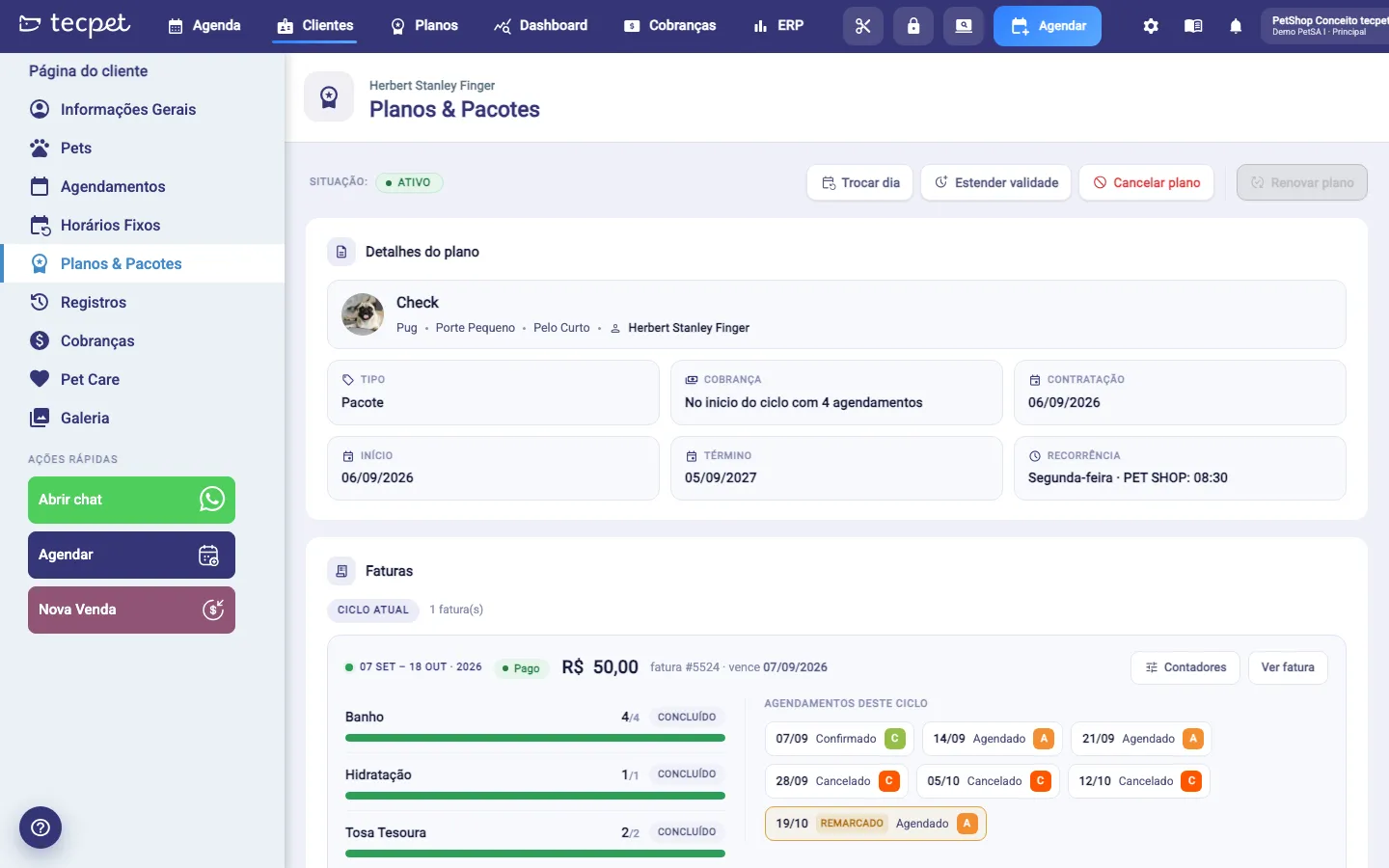
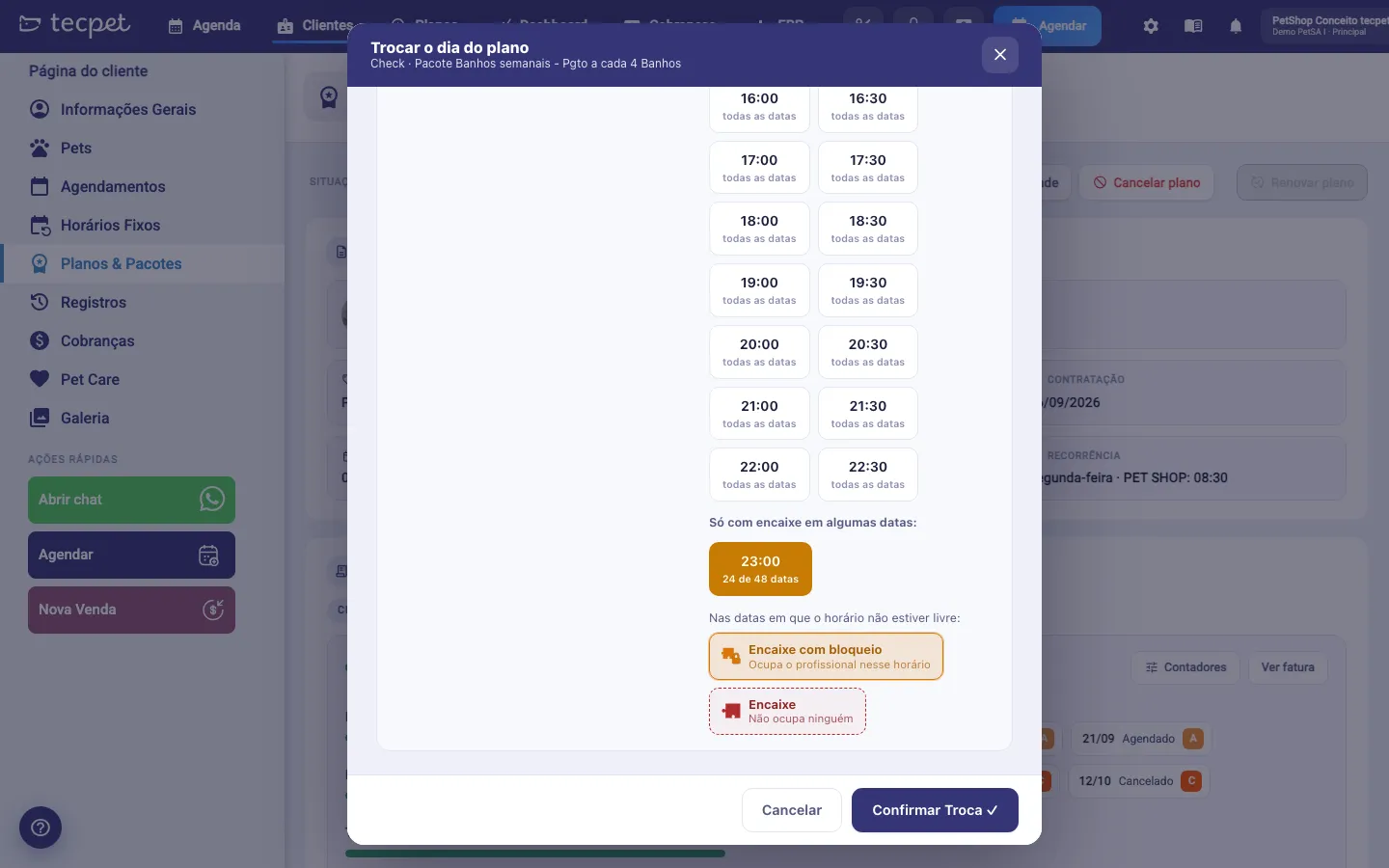
Section titled “Change the day of the whole plan”To change the weekday of every future appointment at once, use Change day, at the top of the plan screen. The Change the plan’s day window asks, in this order:
- the New weekday (the days the shop is closed are pointed out);
- the date from which to apply the change: only the bookings from that date onwards are moved, the earlier ones stay as they are;
- the new time, on the same grid as the sale: the Free on every date group lists the times that fit every week, and the Only with overbooking on some dates group the ones that only fit by overbooking on part of them, with the fraction (e.g. 24 of 48 dates). When you pick a time from that second group, the selector “On the dates where the slot is not free” shows up: Blocking overbooking (takes up the professional at that time) or Overbooking (takes up nobody).
Each appointment is rescheduled within its own week, at the chosen time. The change does not alter values, invoices or counters.
Booking with the package, and when the appointment stays one-off
Section titled “Booking with the package, and when the appointment stays one-off”Having an active package does not make an appointment go into it by itself: the booking only consumes the package when it is marked with the plan at booking time.
- The system looks for the slot starting from the appointment date, checking the following cycles first and only then the previous ones. That way an August appointment doesn’t land in the July cycle.
- The session is only deducted after the appointment actually exists. An attempt that fails halfway does not consume a session.
- If there is no slot in any cycle, the appointment is not created and the system warns you. To serve outside the package, just book it without marking the plan: it comes in as one-off and is charged normally.
- On the invoice, whatever goes beyond what is included shows as “(Extra)” and is charged; whatever fits stays linked to the package.
- In the Services area, each service shows whether it is part of a plan or package, without opening the appointment.