
Follow up on a campaign
After sending, each campaign gets a follow-up screen with what it has already brought (revenue, bookings and what each credit turned into), the message path (sent, delivered, read, replied and booked), the list of who received it with each customer’s reply, and the buttons to Pausar (pause), Retomar (resume), Cancelar restante (cancel the rest) and Duplicar (duplicate). That is also where you find out why a campaign stopped and what to do to keep it going. To create a campaign, see Create a campaign.
Step 1: Find the campaign
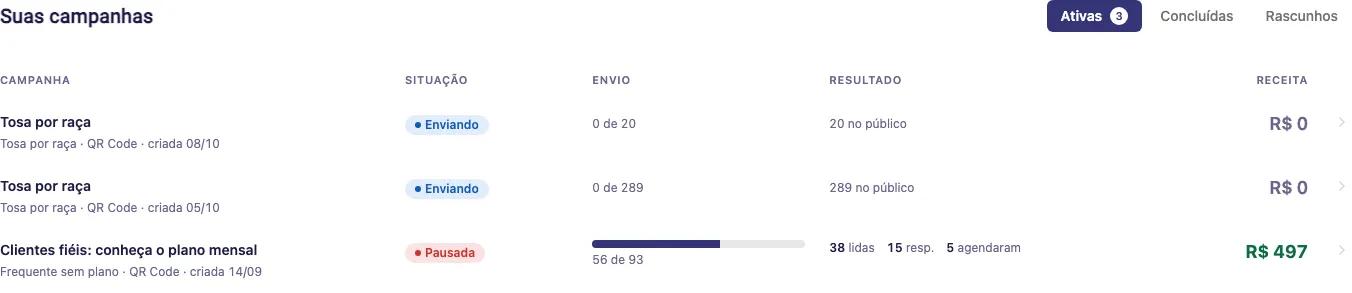
Section titled “Step 1: Find the campaign”In ⋮ > Campanhas, running campaigns show up in Rodando agora, with the progress bar and expected end. The full list is in Suas campanhas, at the bottom of the screen, split into three tabs:
- Ativas (active): sending, scheduled, paused or waiting for approval;
- Concluídas (done): finished or cancelled;
- Rascunhos (drafts): not sent yet.
Each row shows the Campanha (name, goal, connection and creation date), the Situação (status), the Envio (how many went out of the total), the Resultado (reads, replies and how many booked) and the Receita (revenue). The list shows 10 campaigns per page. Click the row to open the follow-up (drafts open the wizard).
Campaign statuses
Section titled “Campaign statuses”- Rascunho (draft): still in the wizard, not sent;
- Aguardando aprovação (waiting for approval): only on the official API, the message is with WhatsApp (up to 24h). It starts on its own when approved;
- Mensagem recusada (message refused): WhatsApp refused the text. Use Corrigir mensagem;
- Pronta para disparar (ready to send): all set, only the sending is missing;
- Agendada (scheduled): will start on the chosen date;
- Enviando or Enviando em partes (sending): messages are going out little by little;
- Pausada (paused): stopped by you, by the automatic protection or by the tecpet team (see the reasons below);
- Concluída (done): every message went out, or the campaign spent 48 hours with nothing to send. Unused credits return to the balance;
- Cancelada (cancelled): you cancelled the rest.
Step 2: Read the results
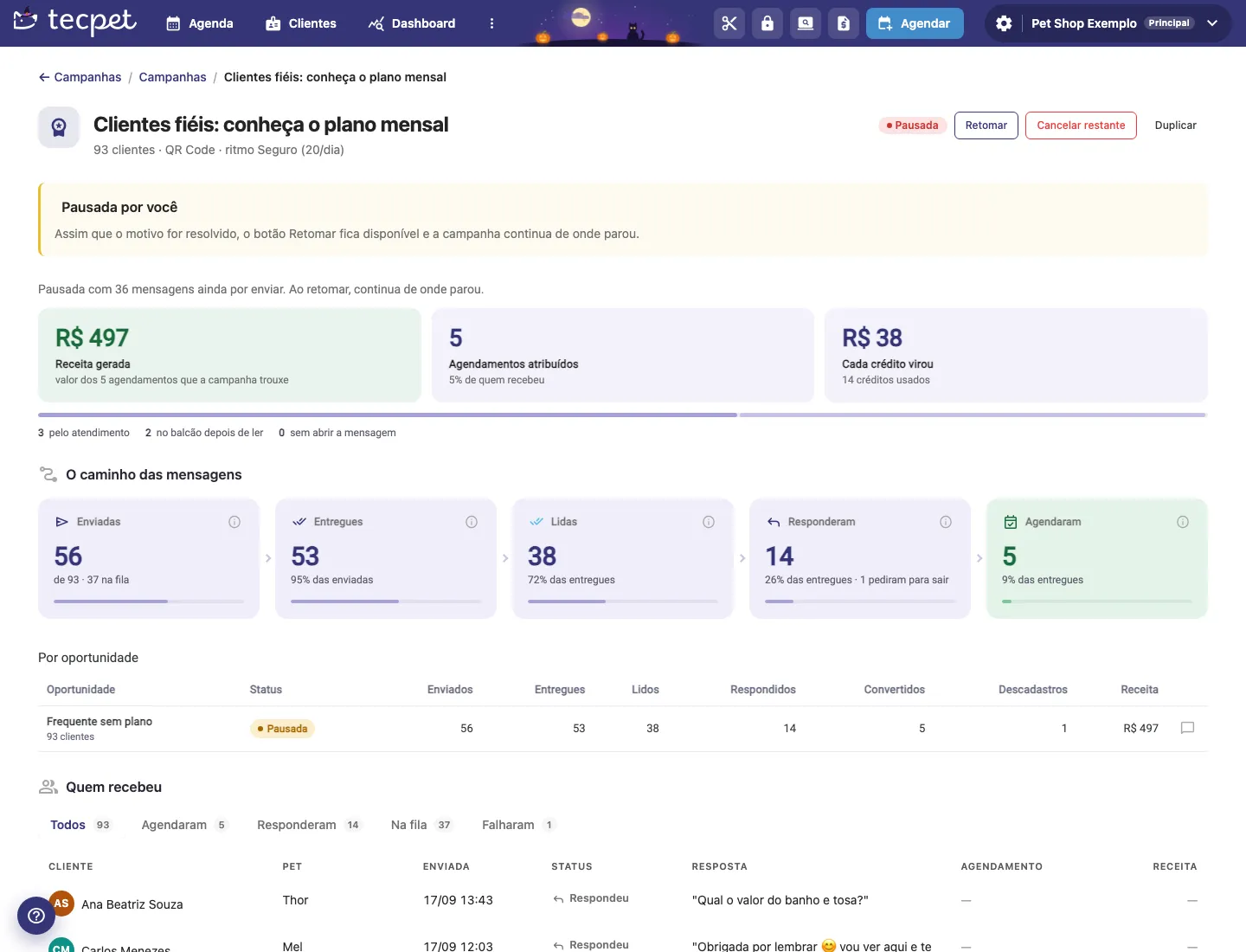
Section titled “Step 2: Read the results”At the top of the follow-up are the name, the audience size, the connection and pace, the status and the action buttons. Right below, the three main numbers:
- Receita gerada (revenue generated): the value of the bookings the campaign brought;
- Agendamentos atribuídos (attributed bookings): how many bookings counted for the campaign and the percentage of recipients;
- Cada crédito virou (each credit turned into): revenue divided by credits used.
The bar below them splits bookings by origin: pelo atendimento (through the service: tapped the button or booked in the chat), no balcão depois de ler (at the counter after reading) and sem abrir a mensagem (without opening the message, would probably have come back anyway). To understand the day window and how the value is calculated, see What Campaigns are.
The message path
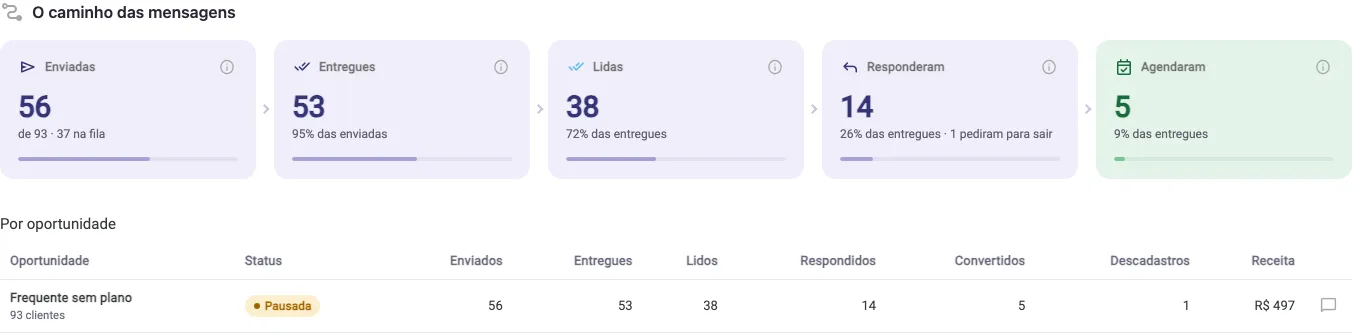
Section titled “The message path”The funnel shows how many messages moved forward at each stage:
- Enviadas (sent): how many went out of the total, and how many are still in the queue;
- Entregues (delivered): WhatsApp confirmed the message reached the phone. This is what the store pays for;
- Lidas (read): counts only those who keep read receipts on, so the real number is always higher;
- Responderam (replied): those who tapped a button or wrote, and how many asked to leave;
- Agendaram (booked): those who booked.
In Por oportunidade (by opportunity), the table repeats these numbers per group (useful in the automatic campaign, which has several), with Descadastros (opt-outs) and Receita. The balloon icon shows the message that group received.
Step 3: See who received and replied
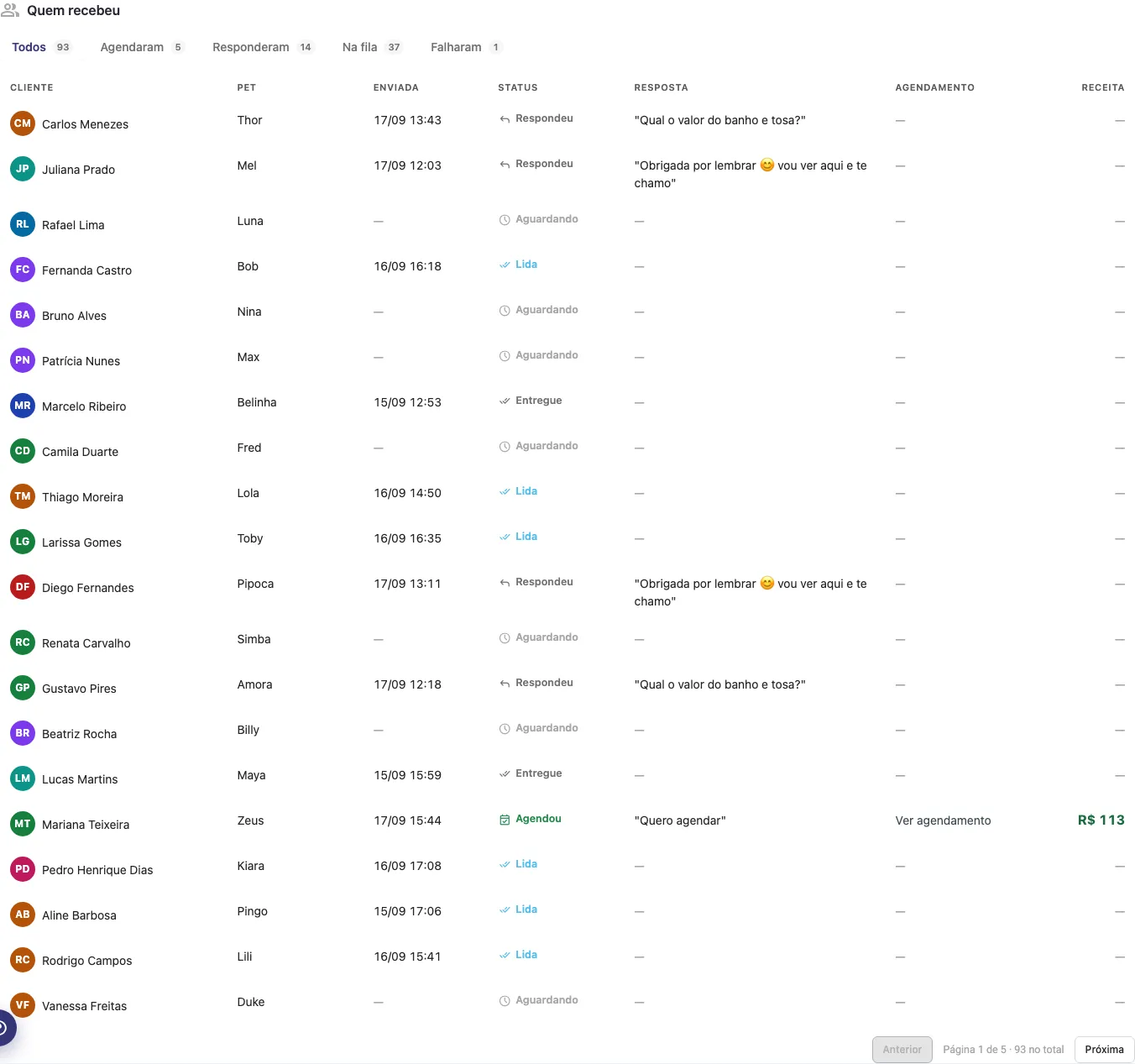
Section titled “Step 3: See who received and replied”The Quem recebeu (who received) section lists each customer in the audience, in tabs: Todos, Agendaram, Responderam, Na fila and Falharam. The columns are Cliente, Pet, Enviada (date and time), Status, Resposta (what the customer wrote or the button tapped), Agendamento (with the Ver agendamento link) and Receita. In the head office account, the Loja column also appears.
Each customer’s Status can be: Aguardando or Na fila (not sent yet), Enviada (sent), Entregue (delivered), Lida (read), Respondeu (replied), Agendou (booked), Pediu para sair (asked to leave), Adiada (postponed, the daily limit had been reached), Falhou (failed) or Cancelada (cancelled).
Step 4: Pause, resume, cancel or duplicate
Section titled “Step 4: Pause, resume, cancel or duplicate”The top buttons change according to the status:
- Pausar (pause): appears while the campaign is Enviando or Agendada. Messages stop going out right away and what is left is kept;
- Retomar (resume): appears on a Pausada campaign. It continues from where it stopped. If the pause was due to a disconnected WhatsApp or number protection, the button is only released once the reason is solved;
- Falar com a gente (talk to us): appears instead of Retomar when the pause was made by the tecpet team;
- Cancelar restante (cancel the rest): ends the campaign and cancels the messages not yet sent. The credits reserved for them return to the balance;
- Duplicar (duplicate): creates a copy as a draft, with the same goal, text and settings, and opens the wizard for you to adjust;
- Editar campanha or Corrigir mensagem: appears while the campaign has not started sending (Pronta para disparar or Mensagem recusada).
A Pronta para disparar campaign also shows the sending block, with both confirmations and the Disparar agora button.
Why a campaign paused
Section titled “Why a campaign paused”When the campaign is Pausada, a yellow notice at the top says the reason:
- Pausada por você (paused by you): someone at the store clicked Pausar;
- Pausada pela proteção automática do número (paused by the automatic number protection): messages stopped reaching customers, a sign WhatsApp may be restricting the number. Wait a while before resuming;
- Pausada: o WhatsApp da loja está desconectado (the store’s WhatsApp is disconnected): reconnect WhatsApp and then click Retomar;
- Pausada: a mensagem foi suspensa pelo WhatsApp or a qualidade do número caiu para o nível vermelho (message suspended or number quality red): only on the official API. See the Meta account health;
- Pausada: atendimento sobrecarregado (service overloaded): more than 15 chats waiting for a reply. Answer the queue and resume;
- Pausada: muitos clientes pediram para sair das campanhas deste número (many customers asked to leave): 5% or more of recipients asked to leave. While this lasts, new sends and resumes are blocked to protect the number;
- Pausada pela equipe da tecpet (paused by the tecpet team): use Falar com a gente.
How we read this campaign
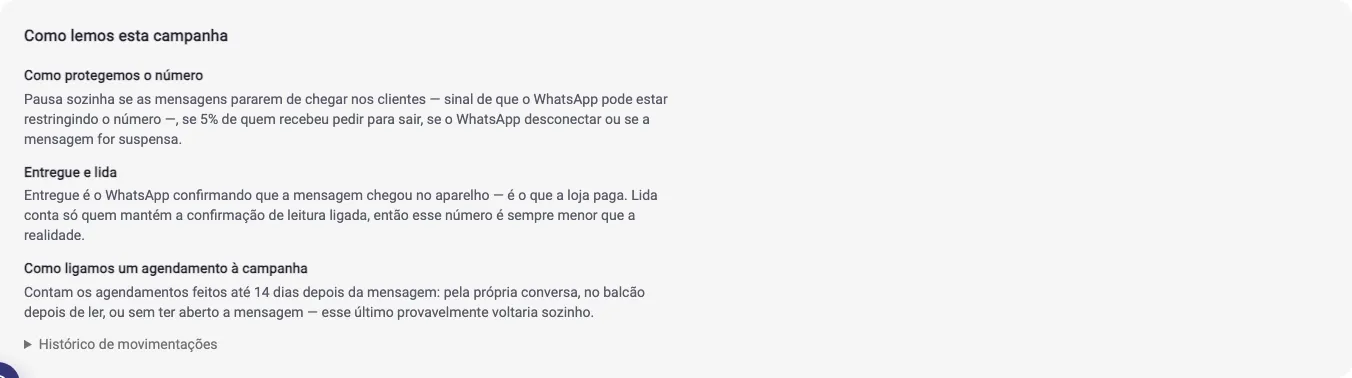
Section titled “How we read this campaign”At the end of the follow-up, Como lemos esta campanha (how we read this campaign) explains in plain language how the numbers are counted (what delivered and read mean, how a booking is linked to the campaign and how tecpet protects the number). The Histórico de movimentações (activity history) records every campaign event, with date and who did it: creation, sending, pauses, resumes and completion.
Where else the campaign shows up
Section titled “Where else the campaign shows up”- In the schedule: the booking modal shows the Veio da campanha badge, with its name;
- In the customer record: whoever asked to leave shows the campaign block, which the store cannot remove, because the request came from the customer;
- In credits: the credit history shows the reservation at sending and the refund of what was not delivered.