
What Campaigns are
Campaigns send a message from the store’s WhatsApp to a group of customers who already bought from you, with buttons for the customer to book, talk to the team or stop receiving. tecpet finds the opportunities in your base on its own (who vanished, who broke their own rhythm, pet birthdays this month, cat owners and others), estimates how much each group is worth, helps write the text and sends it little by little, protecting the number. No message goes out without your approval. After sending, every booking the campaign brought is linked to it, in the schedule and in the results panel, with the amount in reais.
How much is sitting in customers who never came back? #
Your next customer is already yours
Customers who bought and vanished are the easiest sale your store is not making.
“Winning a new customer is expensive. Bringing back someone who already trusts you costs one message.”
In a busy day, nobody has time to open the customer list and find out who stopped coming, whose pet has a birthday coming up, or who has a cat and never tried your feline care. These customers do not complain or warn you: they simply go to the store around the corner, one bath at a time.
With Campaigns, tecpet reads your store history, splits these groups on its own, writes the message in your brand's tone and sends it from your WhatsApp little by little, protecting your number. Whoever taps I want to book goes straight into booking, and every appointment that comes back is linked to the campaign, with the amount in reais.
Where Campaigns are
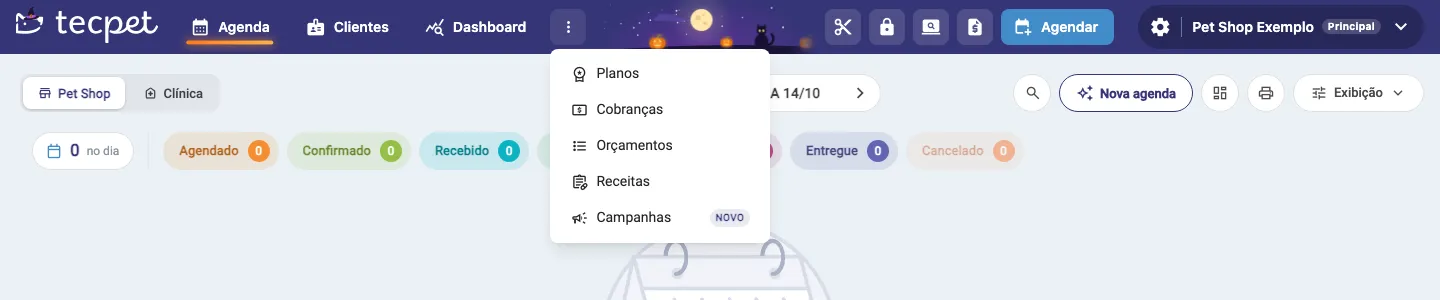
Section titled “Where Campaigns are”In the top menu, click the three dots (⋮) next to Dashboard and choose Campanhas. The item only shows up when the store has a WhatsApp connected, either by QR Code or through the official Meta API.
Some situations keep the Campaigns screen closed, showing instead a presentation page with what is missing:
- WhatsApp disconnected: the Conectar o WhatsApp button appears;
- Store in trial: during the trial the number is shared, so campaigns are released after signing up;
- Campaigns turned off for the store: the Falar com o suporte button appears.
If the store uses the extra password for sensitive areas (the same as the Dashboard), it is also requested when entering Campaigns.
The Campaigns panel
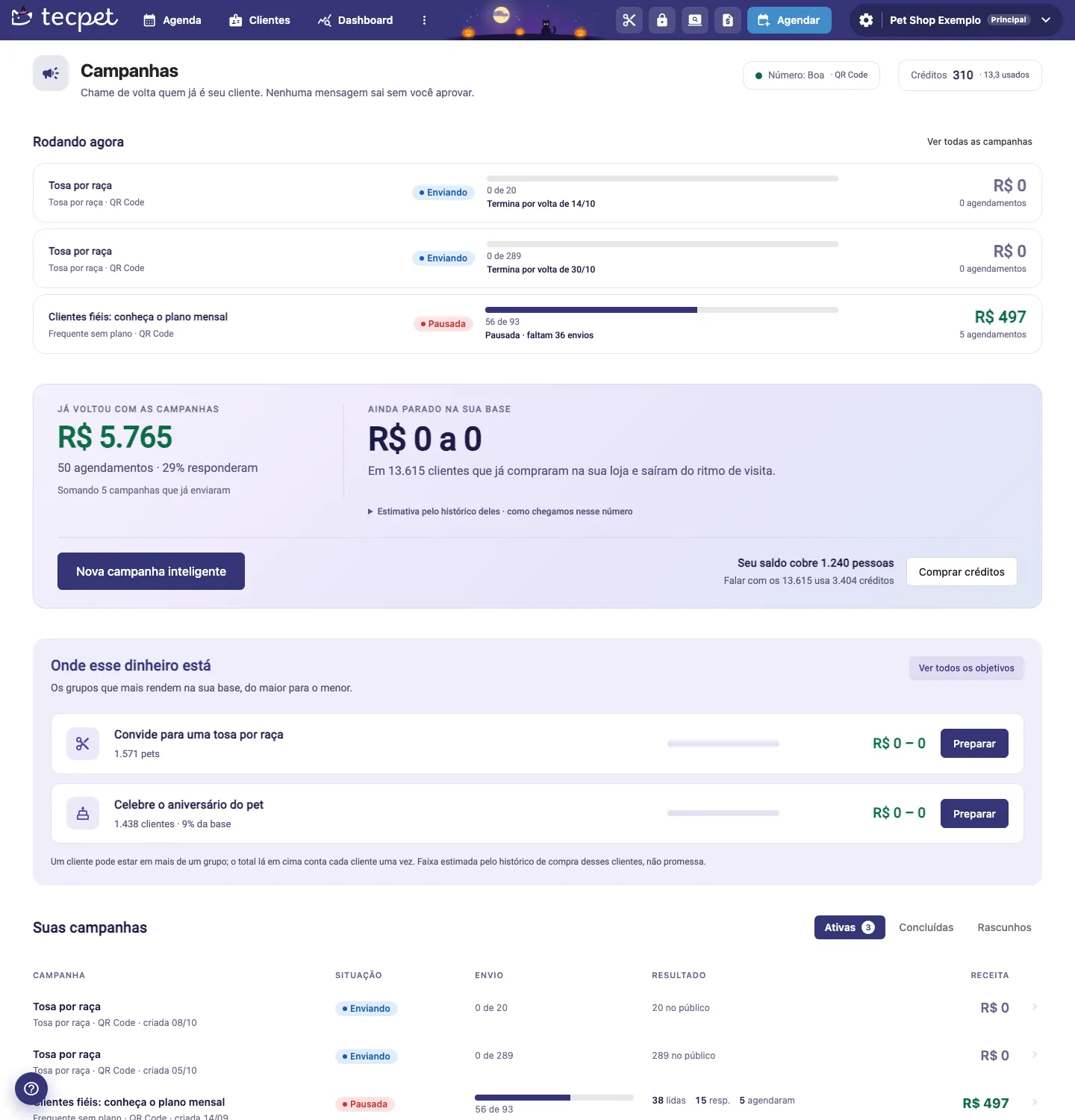
Section titled “The Campaigns panel”The Campaigns screen gathers everything in one place, from top to bottom:
- Header: the number health (Boa, Atenção, Ruim or Desconectada) and the connection type (QR Code or API oficial), your Créditos balance (click to see the history) and the Nova campanha inteligente button;
- Rodando agora (running now): campaigns sending or paused, with the progress bar, how many messages went out, the expected end and how much each one has already brought in reais and bookings;
- Já voltou com as campanhas (already came back): the sum of revenue and bookings of every campaign that has already sent, and the reply rate;
- Ainda parado na sua base (still idle in your base): a range in reais of what customers out of their visit rhythm usually spend, calculated from their history (an estimate, not a promise). Right below, how many people your balance covers and the Comprar créditos button;
- Onde esse dinheiro está (where this money is): the groups that pay the most in your base, from largest to smallest (see the next section);
- Suas campanhas (your campaigns): the full list, in the Ativas, Concluídas and Rascunhos tabs. How to read and act on each one is in Follow up on a campaign.
The opportunities in your base
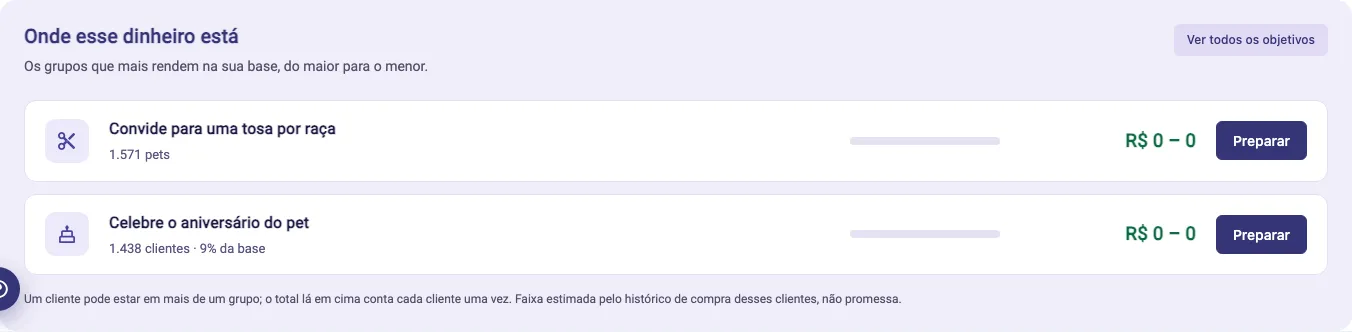
Section titled “The opportunities in your base”In Onde esse dinheiro está, each row is a group of customers tecpet calculated from your store history, with the number of customers (or pets) and the estimated revenue range. The Preparar button opens a new campaign with that audience already set. The groups shown are those with enough people in your base right now; Ver todos os objetivos opens the full list.
The ready-made goals are:
- Quem sumiu (who vanished): owners who used to come and have not shown up for a few weeks;
- Sumidos há muito tempo (gone for a long time): customers idle for months who can still come back;
- Fora do ritmo (out of rhythm): customers with a clear frequency (4 visits or more) who passed their own interval;
- Tosa por raça (breed grooming): a grooming invitation for long-haired breeds or the ones you choose;
- Plano vencendo and Plano vencido: subscribers close to the end or who let the plan lapse;
- Só banho (bath only): those who only get baths and never tried other services;
- Frequente sem plano (frequent without a plan): loyal customers who still pay per visit;
- Vários pets (several pets): owners with more than one pet who only bring one;
- Tutores de gato (cat owners): those who have a cat and do not know your feline care yet;
- Cadastrou e não veio (signed up and never came): recent sign-ups with no visit;
- Aniversariantes do mês (birthdays this month): pets with a birthday this month;
- Cancelou e não remarcou (cancelled and did not rebook): those who cancelled in the last 30 days and did not book again;
- Vacina no prazo and Filhotes e idosos: only for stores with Clinic;
- Creche parada: only for stores with Daycare.
A campaign reaches 5 to 2,000 people. A goal with fewer than 5 customers, or above 2,000 without adjustment, shows up disabled with the reason.
What the customer gets on WhatsApp
Section titled “What the customer gets on WhatsApp”The customer gets the store’s message, with an optional image and up to 3 buttons. With the QR Code connection, the default buttons are:
- Quero agendar (I want to book): the service opens the booking in the same chat. When the store does not have the AI service, or the goal is something the AI does not handle (plans), the button becomes Falar com a equipe and the chat goes to an agent;
- Agora não (not now): the customer gets a kind reply and nothing else happens;
- Não receber ofertas (stop offers): the customer leaves every campaign of the store.
The customer also leaves campaigns by typing SAIR or PARAR. This request is final: the store cannot undo it from the customer record. Any written reply marks the customer as Respondeu in the results.
Who never gets a campaign
Section titled “Who never gets a campaign”Some customers are always left out, without you having to filter:
- those who asked not to receive campaigns;
- records without a valid phone and repeated numbers (each number gets it only once);
- inactive customers and deceased or inactive pets.
Other groups go by default, but you can remove them in the Público step: those who got a campaign in the last 30 days or are in another one’s queue, those who already have an appointment and those talking to the service right now.
How much it costs
Section titled “How much it costs”Campaigns use the account’s same tecpet credits. The main cost is sending, charged per message sent to the client, and the price depends on whether the store has the AI service in its subscription:
| Store situation | Cost per message | In practice |
|---|---|---|
| With the AI service (included in Prime and Max, or added on) | 0.25 credit | 1 credit for every 4 messages |
| Without AI (menu-only chatbot, or no chatbot) | 0.5 credit | 1 credit for every 2 messages |
To check whether your store has the AI, see if Atendimentos com IA shows up under Controle de recursos, in Configurações → Minha Conta → Assinatura (see System modules). Even with the AI in the subscription, the lower price only applies with the chatbot in Auto Atendimento mode: if it is Desligado, in Resposta Automática or in Simulação, the AI does not answer the replies and the campaign costs 0.5 credit per message.
The price per message is set when the campaign is created: if you turn the AI on later, create a new campaign (or use Duplicar) to pay the lower price. The campaign total is always rounded up (101 messages with AI make 25.25, that is, 26 credits).
Besides sending, there are two optional costs:
- Writing with AI: 1 credit per campaign, charged the first time you generate the text, which already includes 3 generations. Each generation after that costs 1 more credit;
- Image created with AI: 1 credit per image.
How the charge works
Section titled “How the charge works”- When sending starts, the cost of the whole audience is reserved from the balance. If the balance does not cover it, the wizard shows how many credits are missing and the Comprar créditos button;
- During sending, each message that goes out to the client without failing uses its share of the reservation;
- When the campaign ends or is cancelled, what was not used (messages that failed or never went out, such as the ones cancelled with Cancelar restante) returns to the balance. The refund shows up in the credit history.
Example with 200 clients in the audience, 180 messages delivered and 20 that failed:
| With AI | Without AI | |
|---|---|---|
| Reserved when sending starts | 50 credits | 100 credits |
| Used (180 messages) | 45 credits | 90 credits |
| Returns to the balance | 5 credits | 10 credits |
The campaign uses campaign credits first, then monthly credits and lastly purchased credits. Campaign and monthly credits only return if the campaign ends within the same month; after the month turns, the part that came from them is not refunded.
With the official Meta API connection, WhatsApp itself charges separately about R$ 0.35 per delivered marketing message, straight to the store’s Meta account (it does not come out of tecpet credits). The wizard shows this estimate next to the credit cost. See how much official WhatsApp costs.
How tecpet protects your number
Section titled “How tecpet protects your number”Sending hundreds of messages at once is the easiest way to get the number blocked. That is why the campaign goes out little by little, within the hours and days you choose, respecting a daily limit per number (adding up all the store’s campaigns):
- WhatsApp by QR Code: up to 20 messages a day on the first campaign, going up to 40 and 60 on the next ones, with a few minutes between each;
- Official Meta API: up to 200 a day, within the number’s limit at Meta.
The campaign pauses on its own when WhatsApp disconnects, when messages stop reaching customers (a sign the number is being restricted), when 5% of recipients ask to leave, when the number quality drops to red or when the message is suspended by WhatsApp. It also pauses if the service piles up more than 15 waiting chats. As soon as the reason is solved, you resume from where it stopped.
How a booking counts for the campaign
Section titled “How a booking counts for the campaign”A booking is linked to the campaign when it is made after the message arrived, within a 14 day window (10 days for Fora do ritmo, Tosa por raça, Só banho and Cancelou e não remarcou; 15 days for Aniversariantes do mês). It can come in three ways:
- through the service: the customer tapped the button or booked in the chat;
- at the counter after reading: the customer read or replied and booked through another channel;
- without opening the message: booked without reading, meaning they would probably have come back anyway.
The amount comes from the booking’s invoice or, while there is none, from the sum of the services. The booking modal shows the Veio da campanha badge, with its name.
Next steps
Section titled “Next steps”- Create a campaign: the wizard step by step, from goal to sending;
- Follow up on a campaign: results, recipients, pause, resume, cancel and duplicate.